


A job application template gives U.S. employers a consistent way to collect applicant details before interviews. It should cover contact details, role information, availability, work history, education, references, and an accuracy certification. The form should avoid unnecessary questions that may create discrimination or state-law problems. This guide gives small businesses a ready-to-copy structure and practical compliance checks. Also worth reading: A Practical Digital Growth Plan for Small Businesses.
| Key area | What to collect | Why it matters |
| Applicant details | Name, phone, email, city and state if needed | Helps you identify and contact candidates |
| Position details | Role, schedule, start date, availability | Confirms basic fit for the opening |
| Qualifications | Work history, education, licenses, relevant skills | Supports consistent screening |
| References | Professional contacts, when useful | Supports later verification |
| Certification | Accuracy statement, signature, date | Creates a clear applicant record |
| Compliance review | State, local, and federal checks | Helps remove risky or unnecessary questions |
Key takeaways
- Use one core form so applicants provide comparable information.
- Keep medical and other sensitive questions out of the initial screening form.
- Separate third-party background-check disclosures from the employment application.
- Review salary-history and criminal-history rules for each hiring location.
- Complete Form I-9 as a separate post-offer employment-verification step.
Direct answer: A U.S. employment application should collect only information needed to evaluate a candidate for the role. Use consistent fields for contact details, availability, experience, education, qualifications, references, and certification. Keep medical questions, I-9 documents, and third-party background-check disclosures out of the initial form.
Free U.S. Employment Application Form Template
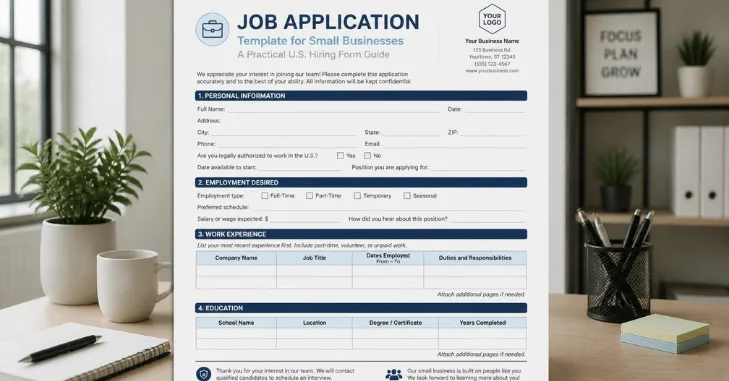
Use the structure below as a starting point for a paper, PDF, or online form. Keep only fields you need to screen candidates for that role. Have employment counsel review the final form for every state and city where you hire.
Employer and position
- Company name:
- Position applied for:
- Application date:
- Preferred schedule: Full-time / Part-time / Temporary / Seasonal
- Earliest available start date:
- Days or shifts available:
Applicant contact
- Full legal name:
- City and state, if needed:
- Phone number:
- Email address:
- Preferred contact method:
Employment history
- Employer name:
- Job title:
- Dates employed:
- Main duties and accomplishments:
- Reason for leaving:
- May we contact this employer? Yes / No
Education, licenses, and skills
- School, college, trade school, or training provider:
- Degree, diploma, certificate, or coursework:
- Job-related licenses or certifications:
- Relevant software, equipment, language, or technical skills:
Work eligibility and schedule
- Are you legally authorized to work in the United States? Yes / No
- Will you now or later require employment visa sponsorship? Yes / No
- Can you meet the stated schedule? Yes / No
Professional references
- Name:
- Relationship:
- Company:
- Phone:
- Email:
Applicant certification
- I certify that the information provided is accurate and complete to the best of my knowledge.
- Applicant signature:
- Date:
Consistency matters more than adding every possible field. Ask candidates for the same core information unless a role creates a legitimate difference. DOJ guidance generally permits questions about work authorization and future visa sponsorship. It recommends avoiding questions about specific citizenship or immigration status.
Business Strategy’s guide to business software and services also covers HR systems for employee records and hiring workflows. Those tools can help growing teams keep applicant data organized. They can also reduce duplicate records when hiring expands across roles.
What to Include in a Job Application Template
The strongest hiring form collects information that helps you make the next hiring decision. It should not replace onboarding, payroll paperwork, or a background-screening packet. Keeping those stages separate also makes the form easier to update when laws or hiring needs change.
Applicant and position details
Start with the candidate’s name, reliable contact information, the position, and availability. Ask for location details only when you have a business reason to collect them. If several locations or shifts are open, give applicants clear choices instead of one large text box.
Work history, education, and references
Request experience that relates to the role and gives managers enough detail for screening. Employment dates, job titles, duties, and job-related certifications can help verify qualifications. References can be optional early if you only contact them for finalists.
Certification and signature
A short certification can ask applicants to confirm that their information is accurate. Keep the language plain and avoid unrelated waivers or dense legal text. Keep any separate authorization required for background screening in its own document.
Questions to Leave Off or Review Carefully
A reusable U.S. form should focus on job-related facts, not personal characteristics. Federal rules limit several pre-employment inquiries, while state and local laws may add tighter restrictions. A national template should include fewer sensitive questions, not more. This guide provides general information and is not legal advice.
| Question area | Safer starting approach | Reason to review |
| Age or date of birth | Omit; ask about a legal minimum age only when relevant | Age questions can create discrimination concerns |
| Marital or family status | Omit | These details are usually unrelated to job qualifications |
| Disability or medical history | Do not ask before a conditional offer | ADA rules restrict pre-offer disability inquiries |
| Salary history | Prefer posted pay ranges or future expectations after review | State and local salary-history rules vary |
| Criminal history | Consider later-stage review | State, local, and job-specific rules may apply |
| Background-check consent | Use a separate disclosure and authorization | FCRA rules apply to third-party consumer reports |
| I-9 documents | Handle after offer acceptance | Employment verification belongs in onboarding |
The EEOC says employers generally cannot ask disability-related questions before a conditional offer. It also advises avoiding non-job-related questions about marital status and children. FTC and EEOC guidance confirms that state and local rules can add further restrictions.
Keep Background Checks Separate From the Application
If you buy a consumer report from a screening company, don’t bury consent in the hiring form. The FTC says the FCRA disclosure must be written and stand-alone. Employers must also obtain written permission before getting the report. Keeping that step separate makes the candidate experience easier to understand.
Criminal history also needs its own review. The EEOC recommends considering that information later and assessing its relevance to the role. State and local rules may be stricter, so employers should check every hiring jurisdiction. Do this review before adding a conviction question to a standard form.
How to Customize the Form for Your Business
Start with the same core form, then add only screening questions tied to the open position. Retail roles may need shift availability, while skilled trades may require licenses or certifications. Office roles may need software skills, but every added question should support a real hiring decision.
Use four checks before publishing:
- Identify the hiring decision each field supports.
- Remove duplicate fields unless exact information is needed.
- Mark optional information clearly when it is not required.
- Test the form on a phone before sending it to candidates.
A digital process also needs secure storage and clear access rules. Business Strategy’s first-office services guide covers document management and systems growing teams often need. Keeping applicant records organized makes it easier to apply the same process across openings.
Employment Application vs. Resume
An employment application and a resume serve different purposes. The employer controls the application format, while the candidate controls the resume format. Using both gives you a consistent record without losing the context and achievements a resume provides.
| Feature | Employment application | Resume |
| Format owner | Employer | Candidate |
| Main purpose | Standardized screening record | Career summary and achievements |
| Information requested | Same core fields for each applicant | Candidate-selected information |
| Best use | Comparing required details consistently | Reviewing experience and accomplishments |
| Signature | Often included | Usually not included |
Do not make applicants retype an entire resume without a clear reason. Ask for structured fields when you need comparable data, exact dates, or required confirmations. Let the resume carry fuller career context when that information already exists there.
Common Mistakes Small Businesses Make
Many forms become longer over time because nobody removes old questions. That creates more candidate effort and can preserve fields that no longer serve a hiring purpose. A shorter, role-focused form is easier to review and easier to keep current.
Common mistakes include:
- Asking for sensitive information too early.
- Combining background-check authorization with the main form.
- Requesting data that already appears on the resume.
- Using one form for every role without relevant adjustments.
- Failing to review state and local rules before hiring elsewhere.
Review the form when hiring locations, screening vendors, or job requirements change. Give managers one approved version instead of letting each manager create a separate form. Businessstry’s small-business coverage can support related operating processes as your company grows.
Your Next Step
Copy the core form, remove fields you do not need, and add only role-specific screening questions. Review federal, state, and local requirements before publishing or expanding into a new hiring location. Keep the approved version with your other operating documents so managers use one consistent process.
Frequently Asked Questions
What should a job application template include?
It should include contact details, the role sought, availability, relevant experience, education, qualifications, and an accuracy certification. Professional references can be optional if you do not need them during initial screening. Keep each field tied to a legitimate hiring purpose.
Can I ask applicants for salary history?
Rules differ by jurisdiction, so do not assume one national answer fits every location. U.S. Department of Labor research notes that salary-history bans vary in coverage and provisions. A safer form focuses on the role’s pay range or future expectations after local-law review.
Can I ask about criminal history?
Federal law does not create one universal private-employer application rule for every job. The EEOC says state or local laws may restrict criminal-history inquiries. It also recommends considering such information later in the hiring process. Check the hiring location and industry requirements before adding that field.
Should background-check authorization be in the same form?
Not when you obtain a third-party consumer report covered by the FCRA. The FTC says the required disclosure must use a stand-alone format. Employers also need written permission before obtaining the report.
When should Form I-9 be completed?
USCIS says employees complete Form I-9 Section 1 only after accepting a job offer. It must be finished no later than the first workday. Do not use the pre-offer form to collect identity or work-authorization documents. Complete verification as a separate onboarding step after the offer is accepted.