

Choosing a card machine can affect checkout speed, payment costs, and daily operations. The right system should accept modern payment methods without adding unnecessary fees or complicated software. Small businesses should compare hardware price, processing rates, portability, integrations, and contract terms before choosing.
Quick answer: Credit card machines for small businesses range from simple mobile readers to complete countertop POS terminals. Square, PayPal, Stripe, Shopify, Clover, Helcim, and SumUp provide options for different business models. Compare total processing costs rather than choosing a machine based only on its purchase price.
| Option | Typical Hardware Starting Cost | Pricing Style | Good Fit For |
|---|---|---|---|
| Square | From $59 | Flat-rate processing | General small businesses |
| PayPal Point of Sale | From $29 | Flat-rate processing | Mobile and occasional sellers |
| Stripe Terminal | From $59 | Flat-rate processing | Tech-focused and omnichannel businesses |
| Shopify POS | From $49 | Plan-based processing | Retailers with ecommerce stores |
| Clover | Varies by device and plan | Plan and processor dependent | Restaurants and established retailers |
| Helcim | From about $199 | Interchange-plus | Growing payment volume |
| SumUp | From about $54 | Flat-rate processing | Simple mobile checkout |
Prices and processing terms can change. Check each provider’s current U.S. pricing before purchasing hardware or signing an agreement.
What Are Credit Cards Machines for Small Business?
Credit card machines for small business are devices that let merchants accept debit cards, credit cards, and digital wallets in person. Modern machines usually support EMV chip payments and contactless transactions. Many also connect directly with point-of-sale software for sales reporting and inventory management.
The hardware is only one part of the payment system. A payment processor authorizes transactions and moves approved funds through the payment network. Your total cost can therefore include hardware, transaction charges, subscriptions, and optional business software.
Some businesses no longer need a traditional countertop terminal. A compact reader connected to a phone may work for mobile businesses and occasional sellers. Busy stores may benefit from dedicated hardware with a screen, receipt printer, and stronger POS features.
7 Credit Card Machine Options Worth Comparing
The strongest choice depends on where you sell and how much you process. A food truck has different requirements from a busy retail store. These seven options cover several common U.S. small-business needs.
1. Square
Square offers several hardware choices, including portable readers and the all-in-one Square Terminal. Its contactless and chip reader starts at $59, while Square Terminal costs $299. The terminal includes a screen and a built-in receipt printer.
Square’s standard Free plan charges 2.6% plus 15 cents for an in-person tap, dip, or swipe. Paid plans can provide lower in-person rates. The broad hardware range makes Square practical for businesses that want to start small and add equipment later.
Pros.
- Several hardware choices
- Free POS plan available
- Supports chip and contactless payments
- Suitable for mobile or countertop use
- Inventory and reporting tools available
Cons.
- Processing fees become significant at higher sales volumes
- Some advanced features require paid plans
2. PayPal Point of Sale
PayPal offers one of the lower hardware entry costs among major providers. Its first Card Reader is currently listed at $29, while its standalone Terminal costs $199. The reader connects to a compatible phone or tablet.
Standard U.S. card-present transactions are currently priced at 2.29% plus 9 cents. PayPal states that its POS software has no monthly or setup fee. This combination may appeal to businesses seeking straightforward mobile payments with limited upfront spending.
Pros.
- Low initial reader cost
- No standard monthly POS subscription
- Familiar payment brand
- Portable terminal available
Cons.
- Basic reader needs a separate mobile device
- Some businesses may need more specialized POS functions
3. Stripe Terminal
Stripe Terminal is designed for businesses that want in-person payments connected with a broader digital payment setup. The Stripe Reader M2 is listed at $59, while smart readers such as the S700 cost $299. Stripe also supports Tap to Pay on compatible phones.
Stripe currently lists U.S. in-person card pricing at 2.7% plus 5 cents per successful domestic transaction. Its developer tools make the platform especially useful for businesses building customized payment experiences. A simple local store may not need that level of flexibility.
Pros.
- Strong developer tools
- Connects online and physical payments
- Multiple reader formats
- Supports custom POS integrations
Cons.
- More technical than some plug-and-play systems
- Custom integrations can require development work
4. Shopify POS
Shopify POS deserves attention when a business already sells through a Shopify online store. Its card-reader hardware starts around $49, depending on the device and current availability. Sales information can stay connected across online and physical channels.
Current published comparisons place Shopify’s U.S. in-person processing around 2.4% to 2.6% plus 10 cents, depending on the plan. Businesses should also consider their Shopify subscription when calculating total costs. This option makes the most sense when ecommerce is already central to operations.
Pros.
- Strong ecommerce connection
- Unified inventory management
- Multiple retail hardware choices
- Useful for omnichannel retailers
Cons.
- Shopify subscription costs affect total expense
- Less compelling if you don’t use Shopify for ecommerce
5. Clover
Clover provides payment hardware ranging from compact countertop equipment to handheld and full POS systems. Restaurants, service companies, and retail stores commonly use its devices. Clover also supports business-specific apps and POS functions.
Pricing deserves careful review because hardware, software, processing, and contract terms can vary. Businesses should request a complete cost breakdown before committing. Clover makes sense when a merchant wants a more substantial POS system than a basic reader.
Pros.
- Broad hardware selection
- Restaurant and retail features
- App marketplace
- Suitable for growing operations
Cons.
- Pricing can be more complex
- Costs and contract terms may vary by arrangement
6. Helcim
Helcim takes a different approach from many flat-rate providers. It uses interchange-plus pricing and offers automatic volume discounts as payment volume grows. This structure can become attractive to businesses processing larger monthly amounts.
The company also provides dedicated payment hardware and POS tools. Owners should estimate costs using their average ticket and monthly processing volume before comparing Helcim with flat-rate services. A lower percentage doesn’t tell the full story without transaction data.
Pros.
- Interchange-plus pricing
- Volume discounts
- No standard monthly processing subscription
- Designed for growing transaction volume
Cons.
- Costs are less predictable than a single flat rate
- Smaller merchants may prefer simpler pricing
7. SumUp
SumUp focuses on simple card acceptance and compact hardware. Current market comparisons place entry-level hardware around the mid-$50 range in the United States. Its straightforward setup can suit merchants that don’t need extensive back-office features.
The system is worth comparing for market stalls, independent professionals, and other mobile sellers. Larger businesses may want deeper inventory, staff, and reporting capabilities. Your choice should reflect operational needs rather than hardware price alone.
Pros.
- Affordable hardware
- Simple setup
- Portable options
- Suitable for occasional or mobile selling
Cons.
- Fewer advanced capabilities than larger POS ecosystems
- Growing businesses may eventually need more features
How to Choose a Credit Card Machine
Start by calculating your expected monthly card sales and average transaction amount. Processing rates that appear similar can produce different costs because fixed per-transaction charges matter. A business processing many $10 purchases has different economics from one processing fewer $500 purchases.
Next, decide where customers will pay. Mobile professionals need battery life and wireless connectivity, while retail counters may prioritize printers and inventory tools. Restaurants may need tipping, order management, kitchen integrations, and portable tableside checkout.
You should also review the broader software ecosystem. Business Strategy’s guidance on software and services every business needs emphasizes the value of tools that support efficient operations and useful financial data. A payment terminal that connects cleanly with your accounting, inventory, and sales systems can reduce repetitive administrative work.
Finally, read the agreement before buying equipment. Check monthly fees, PCI-related charges, chargeback costs, contract length, cancellation terms, and hardware financing. Low-cost equipment can become expensive when attached to unsuitable processing terms.
Ask how the provider handles debit cards. The Federal Reserve’s Regulation II, in force since 2011, requires debit transactions to be processable over at least two unaffiliated networks. It also bars networks and issuers from blocking a merchant’s choice of routing among the networks a card supports.
Card Reader vs. Full POS Terminal
A card reader is usually the cheaper route. It often connects to a smartphone or tablet and handles chip and contactless payments. This setup works well for contractors, market sellers, mobile services, and businesses with limited checkout volume.
A full terminal costs more but can replace several pieces of equipment. Depending on the model, it may include a touchscreen, receipt printer, barcode tools, and POS software. Retail stores and restaurants can benefit when faster checkout and centralized sales data justify the extra cost.
Your business does not automatically need the most expensive machine. Start with the functions customers and employees use every day. Add advanced hardware when transaction volume or operational complexity creates a clear reason.
How Much Does a Small Business Card Machine Cost?
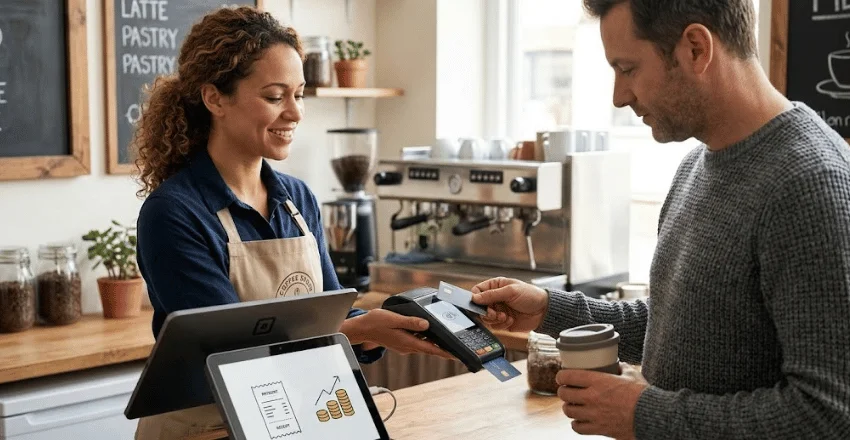
Entry-level readers can cost under $60, while smart terminals often cost several hundred dollars. Complete registers and specialized restaurant systems can cost considerably more. Hardware financing can reduce the upfront payment, but it does not necessarily reduce total cost.
Processing fees usually have a greater long-term effect than the purchase price. For example, a difference of 0.30 percentage points equals $30 for every $10,000 processed. Over a full year, that difference can outweigh the savings from choosing cheaper hardware.
Create a 12-month cost estimate before deciding. Include hardware, monthly software, processing fees, accessories, and likely add-ons. This simple comparison gives you a clearer view than promotional hardware pricing alone.
Our Practical Verdict
For many small U.S. businesses, Square is a sensible starting point because it offers several hardware levels and straightforward POS options. PayPal is worth comparing when low-cost mobile hardware matters, while Shopify fits businesses already centered on ecommerce. Stripe is a stronger candidate when custom software integration is a major requirement.
Higher-volume businesses should compare Helcim’s interchange-plus model against flat-rate providers using their own transaction history. Restaurants and retailers needing a broader POS setup may find Clover more suitable. The right answer depends on transaction volume, average ticket size, sales channels, and required software.
Frequently Asked Questions
What is the best credit card machine for a small business?
No single machine suits every company. Square works well for many general small businesses, while Shopify suits ecommerce-focused retailers and Stripe supports custom integrations. Compare the total annual cost and the features your operation needs.
How much are credit card machines for small businesses?
Basic readers can start below $60, while all-in-one smart terminals often cost around $200 to $300 or more. Full registers can cost considerably more. Remember that processing charges usually matter more than the one-time hardware price over several years.
Can I accept credit cards without buying a machine?
Yes, some processors support Tap to Pay on compatible smartphones. This lets a business accept eligible contactless cards and digital wallets without a separate reader. Compatibility, fees, and supported payment methods vary by provider.
Do small businesses need a merchant account?
Not always. Payment service providers such as Square and Stripe can let qualifying businesses accept payments without opening a traditional standalone merchant account. Other processing arrangements may use dedicated merchant accounts.
What payment methods should a modern card machine accept?
Look for EMV chip cards and NFC contactless payments as basic requirements. Contactless support usually covers popular digital wallets on compatible systems. Magstripe support can remain useful, but it shouldn’t be the primary technology in a new setup.
Choose Based on Total Cost, Not the Cheapest Machine
Credit card machines for small businesses should make payments easier without creating avoidable costs or operational problems. Compare processing fees, hardware, contracts, software, and integrations as one package. The cheapest device at checkout is not necessarily the least expensive system to operate.
Before signing up, estimate twelve months of costs using your expected sales and average transaction value. Then compare two or three providers using the same numbers. That approach gives your business a payment setup based on its real needs, not a promotional hardware price.